I've been building eurorack systems for years, but I went kind of nuts during COVID and ended up with a massive eurorack collection, which I'm finally getting around to putting mostly all in one case. Here are the left and right halves. I'd be interested in thoughts about whether this kind of arrangement of modules makes sense or it would be better to group it by complete voices rather than all VCOs in one place, etc. Any suggestions for making this more usable in general would be great, it's a bit overwhelming. (And yes, I know it's crazy to have a case this big but it's too late now so I might as well use it...).
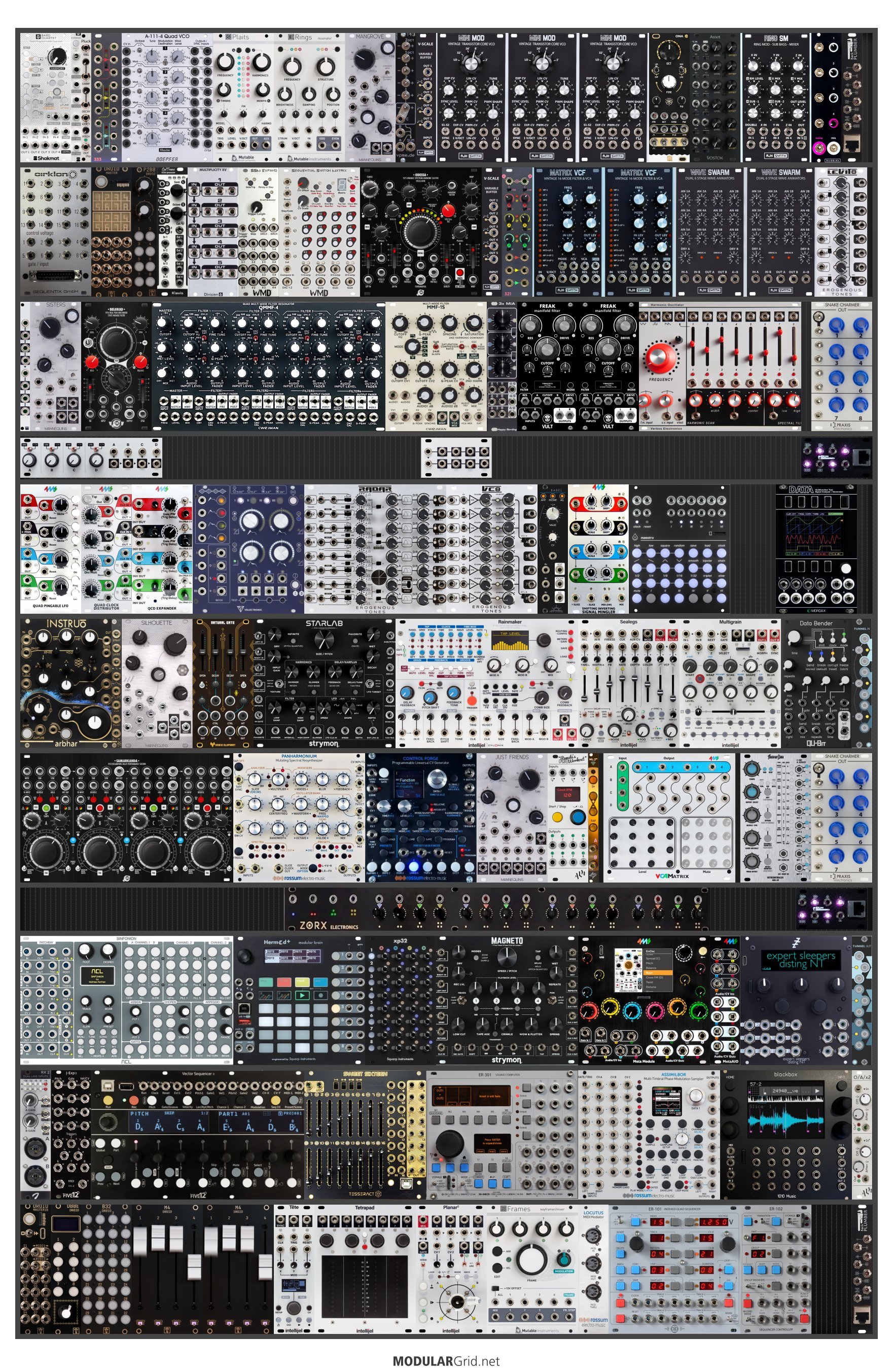
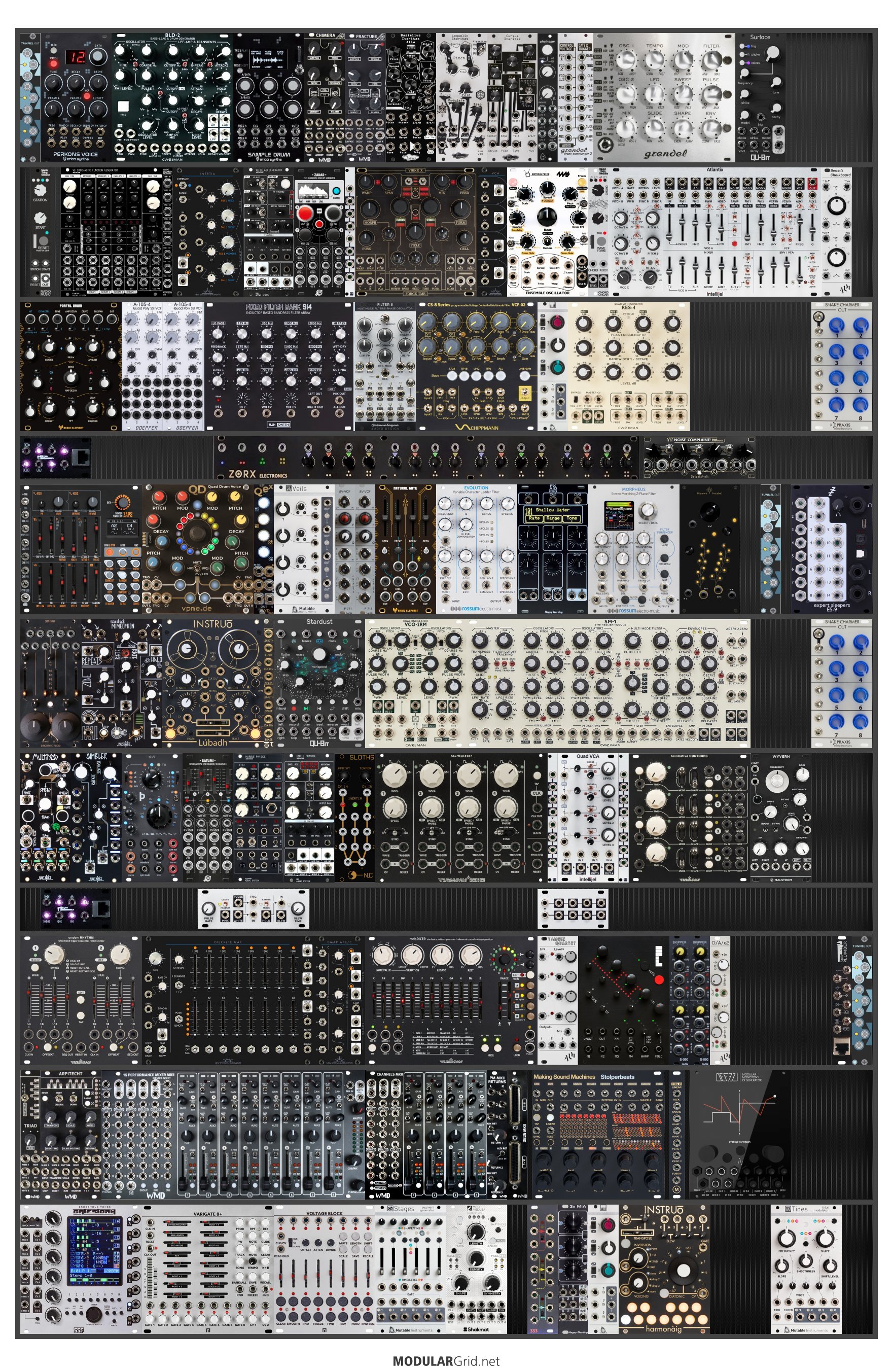
Mega case advice


You've got some real gems there... I've got a relatively large case as well (though not nearly this size), and I've found that arrangement helps tremendously. I move from left to right, sequencing -> modulation -> oscillators -> filters and VCA -> mixing and effects, with things that require more interaction or external connection toward the bottom and edges. Modular being what it is, there's a lot of flexibility toward what functions modules can serve, but finding an arrangement that orients you helps reduce the mental load of reorienting yourself over and over again.
The other thing I've found helpful is a change in mindset - just because you have a large case of modules doesn't mean they all have to occur in patches all the time. If you don't start from a melody or a musical idea, focus on exploring couple of modules or features, and build from there. That'll help you both master your system piece by piece and reduce the paralysis of having so many options to explore
Just reupped it - I realized I'd posted the same half of the case twice by accident. So when you say sequencers on the left, you'd arrange them vertically? And I completely agree that trying to use all of this at once is more than I can realistically handle, plus it just ends up being a mess of sound unless you're Colin Benders.
That's correct, I generally place my sequencers in a vertical block on the very left (my primary sequencers are Ornaments and Crime modules).
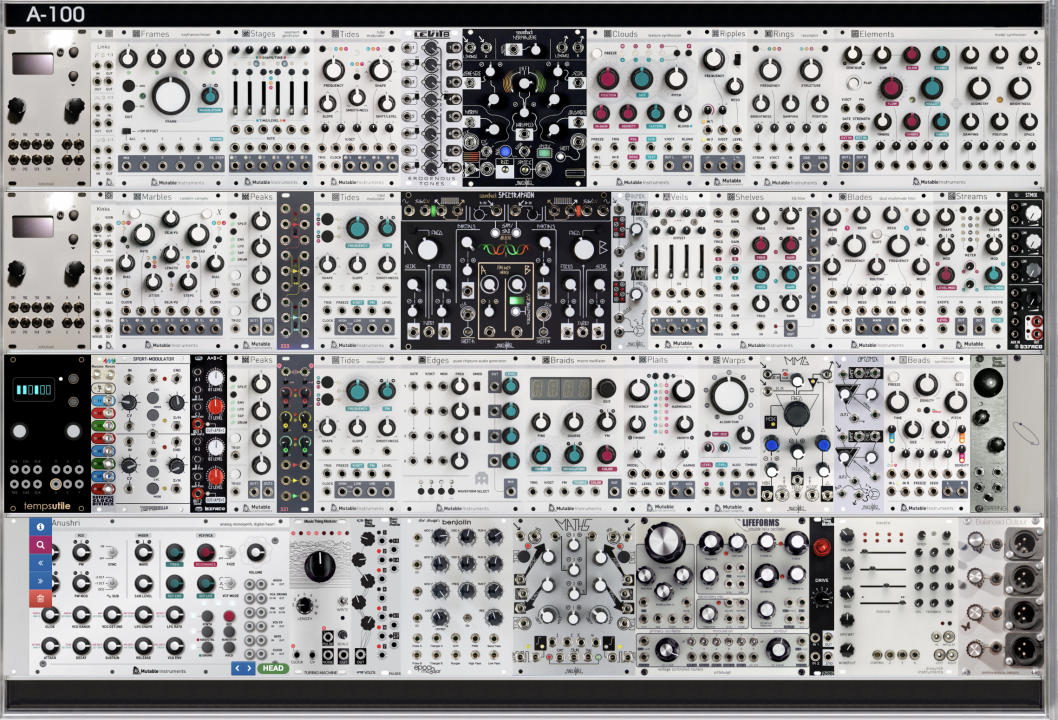
This is probably my seventh or eighth reconfiguration of my case, and it's the happiest I've been with an arrangement so far. Admittedly, I try to get modules to line up for aesthetic reasons, which is entirely unnecessary, but it helps to visually compartmentalize things

...Any suggestions for making this more usable in general would be great...
-- dform98
I also have a rather large case. I can’t really give you a concrete recommendation, but I can share some of my personal learnings from the last few years.
Some of these points may not apply to you, since my setup has a few special characteristics:
- In most situations, the case is used by two people simultaneously.
- The case sits on a wheeled, height-adjustable desk, so it can be used sitting or standing.
- I designed a custom, internal “signal bus” inside the case that supplies most clock- and reset-capable modules from the back with clock and reset signals by default.
This default routing can be overridden (“overpatched”) via a dedicated module if needed. - The horizontal part of my case is 6U. It mainly holds a Keystep Pro and a Launchpad for drum sequencing.
First approach: Top to bottom (by rough function)
I initially organized the case from top to bottom with a coarse functional grouping:
- VCOs
- Filters + envelopes
- Envelopes + VCAs + utilities
- Drum section + utilities
- Mixer + effects
- Sequencers
What bothered me most with this setup was that, once patches were already in place, I constantly had to look closely to understand what was currently doing what and how things were connected.
Second approach: Outside to inside
Next, I tried an “outside to inside” layout. In most rows it looked roughly like this:
VCO | Filter | Envelope | VCA | FX || Modulation / Utilities || FX | VCA | Envelope | Filter | VCO
Pros
- In many cases, the signal flow was easier to remember and visually more intuitive.
Cons
- I tended to patch the same or very similar signal flows over and over again, instead of exploring new routing ideas.
Current approach: Relevance-based (pretending the case is smaller)
My current strategy is to pretend that I have a much smaller case and to arrange modules primarily by relevance — a softened form of “decluttering”.
- Modules I use rarely or that have little interaction go into the upper half (top 9U).
- Modules that should live in my fictional “small case” go into the lower half (everything below those top 9U).
The lower half now again starts from the top with VCOs.
With this setup, I can reach basically everything while sitting down, without having to stand up. Cable runs also tend to be a bit shorter.
If it turns out that I start using a module from the upper half a lot, something from the lower half has to make room — and that module moves down.
General principles that apply to all approaches
Same brand grouped together?
Absolutely not — and completely irrelevant anyway. My case is not a beauty salon.
Quite the opposite: duplicate modules or modules with similar functionality are deliberately spread left and right across the case to keep cable runs shorter.The drum section is always grouped together as a “drum island”, with its own mixer, and is largely permanently patched.
The final mixer sits in the center of the lowest vertical row.
At the very front of the horizontal part of the rack (which is fairly small in my case due to the Keystep Pro and Launchpad), I keep performance-oriented modules:
- Master FX over the full audio sum (Oxi Meta)
- Control for a DJ-style filter over the full drum sum (Disting mk4)
- Manual triggers
- Joystick
Maybe one or two of these thought processes are useful to you.
Happy patching with your impressive setup!
- I designed a custom, internal “signal bus” inside the case that supplies most clock- and reset-capable modules from the back with clock and reset signals by default.
-- modular01
I would really love to hear more about that - right now I'm using the Rack Plumbers for clock/reset distribution but an internal bus for that would be so much nicer.
Your suggestion of layout by relevance is kind of genius - I'd never thought of that before and I'm going to noodle on it a bit. I also agree completely about organizing by manufacturer.
Are there any utility modules or accessories that help you keep things organized in a big case (apart from your custom clock bus)? I got a bunch of nest tamers, lots of Tendrils for fixed patching, etc., but there are always neat, obscure things out there.
For my permanent wiring I exclusively use right-angle plugs, and for regular patching I use straight plugs.
That makes it very easy to completely unpatch the rack without accidentally pulling out connections that are meant to stay permanent.
Long term, I’d like to switch the permanent wiring to Tendrils – Stakkas, but that’s mainly a matter of cost and availability.
When entire cable runs go vertically through the case, I also don’t mind placing a blank panel underneath them.
Unfortunately, I think my custom internal signal bus is hard to retrofit into “normal” Eurorack cases simply due to space constraints.
On top of that, I’ve modded all relevant modules by soldering a small wire to their CLOCK, RESET, and GND points and adding a custom connector. It’s a very minimal modification and easy to undo, but understandably not everyone is comfortable doing that.
Anyway, I’m planning to put together a small presentation about it sometime soon.
As for clocking in general: I don’t know how it is in your system, but in mine it’s technically impossible to drive all clock/reset-capable modules from the same clock. Roughly half of them would have an offset.
Because of that, I built an alternative master clock using an Arduino.
The idea is simple: the first clock pulse is withheld, not sent out.
Additionally, some modules in my setup require an inverted reset signal to end up perfectly in sync again after pressing stop/start.
It’s a bit unfortunate that there’s no real standard for this.
Right now I’m very keen to try @roboDNA’s PULSE module. I’m really curious whether it can solve these sync issues and potentially make my Arduino obsolete.
Ideally, it would also allow tempo divisions (and maybe multiplications in the future) for permanently patched modules while accounting for the often very idiosyncratic reset behavior of different modules. In case it solves this problem i probably will add 2 PULSE instances to my rack.
What matters most to me is simple:
after hitting stop and start, everything must still be perfectly in sync.
...I'm finally getting around to putting mostly all in one case...
-- dform98
Purely out of curiosity: do you build your mega case yourself, or is it something you buy ready-made?
How big will it end up being in the end?
And what non-Eurorack gear are you using together with the case (I noticed you have a Cirklon expander mounted in it)?

An impressive build, but what we'd really like to see is your giant collection of patchcords!
--