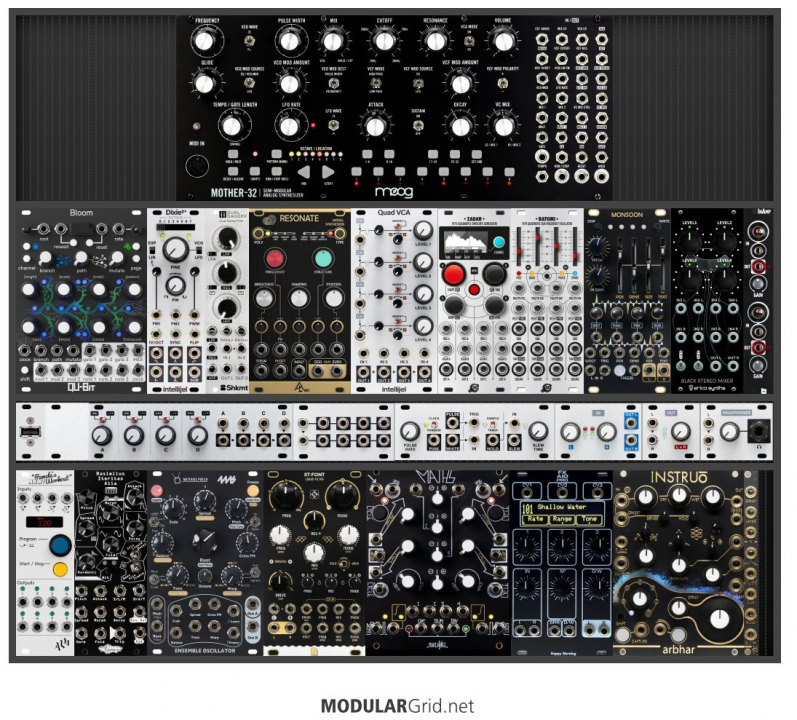
Thanks for the link.
IMO, Pam's is a great module, but a poor sequencer. It's pretty much a set-and-forget module to me, as making changes to it mid-jam is awfully menu-divey and can be hard to stay in the flow. I like it as a master clock, as a eucliedean trigger source, and as a tempo-synced LFO source. I have used it as a (quantized) random pitch sequencer, but it's a high-friction workflow.
Haven't used Bloom myself, but it has a good reputation from what I've seen, and it seems like it'd fit very well in a generative ambient case.
There's a lot of stuff in the rack so my first thought is "Step back and make one interesting voice first". You have four noise sources: Dixie, BIA, Rings (or Resonate, as it were), Ensemble Oscillator. Dixie is a good general-purpose VCO. Rings is great at what it does, but borderline stereotypical with how often people fall into the same handful of patches with it. BIA is a great module, but I usually think of it as a more aggressive industrial sound than that I think you're describing. If I were to pare this selection down to just one, whether as an academic exercise or for budget reasons, I'd go with the Dixie. It's the most basic, but also the most flexible of the lot. Even if you expand to a "Fancier" noise source later on, it can be good to have a "normal" VCO on hand for audio-rate FM.
VCOs want a VCF, 1-2 VCAs, and 1-2 envelopes. You've got that with the Dual Dagger, Intellijel Quad VCA, and Zadar. I lust after the Zadar myself, but I've heard mixed reviews about it as a "primary" envelope generator. That is, it's harder to make a standard ADSR envelope with separate control over each of the 4 stages. That may or may not matter for the sounds you're planning to make, just be aware.
What's a modular synth without extra modulation sources? You've got 4x LFOs from the Batumi, 2x extra envelopes from the Zadar, S+H Noise from the 1U Noise Tools, and 1-2 signals from Maths. Awesome. However, you only have those 4 channels of VCA for those 11 modulation sources. You've got 4 channels of passive attenuator with the 1U Quadratt, so that can help "turn down" the modulation from these sources, but more actual VCA channels would open more doors for complex modulation. I'd also suggest a DC-coupled mixer or two for combining CV sources (The Quadratt can serve this role).
I'm not intimately familiar with Monsoon or Arbhar, but they seem to fill pretty similar niches. They're both granular processors. Mimeophon is slightly different but still a pretty close cousin to those two. How do you intend to use them, is there a reason for having all three of them?
I think if you already have the Mother-32, making a single Euro voice, sequencing that + M32 from the Bloom, then playing around with modulation sources and utilities, will give you a LOT of options to work with. Once you have that going, you can start exploring what next steps to pursue. Maybe another voice, maybe more effects, maybe CV sources, maybe utilities for your existing CVs.


 ![]
![]