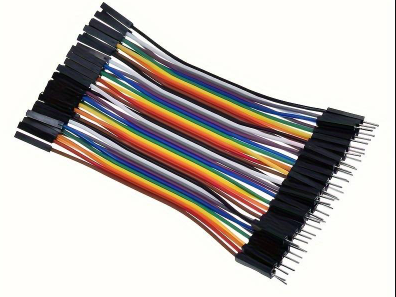
hi, i have a tesseract tex mix with stereo and mono modules. i want to add an extra mono module but the cable only has 3 connectors. Searched everywhere online. Anyone know where i can find one with 4 or 5 connectors?


-- Nilbig

I don't own a Tex Mix myself, but I assume you are referring to this cable!?

A few things to consider:
- You have to ensure that the module actually supports attaching that many expanders to a single chain (EDIT: according to the manual (on page 2) 6 channel expanders should be ok).
- You need to make sure the pitch is correct (I assume it's the standard Eurorack 2.54mm pitch).
- If you can't find one online, you can easily build these cables yourself! It's actually quite simple and requires no soldering – you just press the connectors onto the ribbon cable with some pliers. Of course you have to double check the orientation of the connectors + red stripe. But it shouldn't be that hard as you already have a template.

Here are the parts you would need (links are from a German electronics store, but you can find these anywhere):

https://www.reichelt.com/at/en/shop/product/10-pin_idc_socket_with_strain_relief-14571
https://www.reichelt.com/at/en/shop/product/awg28_set_1m_cable_plugs_10-pol-208106
re: the row combobox, when I add a module (with the add icon in the search results), Ican't control where or which row it goes into. And because the mover isn't accessible (I can't just focus on the last module in the row), I can't easily just move everything far right so the next items would be added in the row below.

-- eroe

This might be a good time to revisit an idea I brought up a while ago.

...position of pasted module
currently the pasted module is pasted on the next free space on the very top left.
it would be very useful when you track a click event and place it exactly there after pasting.
this would be especially helpful when rearranging a large rack from scratch with 2 browser windows.
-- modular01

Since a single row can often have multiple separate empty spaces, maybe adding modules could be made much more accessible if there was a way to specify not just the target row, but the exact empty slot you want to place it in (as long as the slot is wide enough).

I don't have a concrete idea on how to implement this technically right now, but perhaps this is a useful angle to consider while working out a solution together.


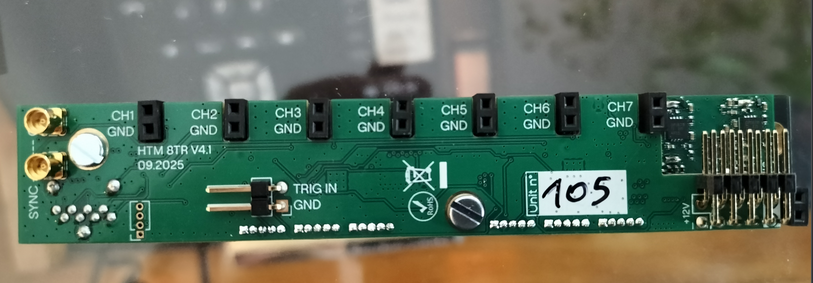
I'm considering creating an internal rack connection between the WMD Performance Mixer MKII expander slots and the 8TR recorder, but I couldn't find any photos of the back of the unit anywhere.

I figured ModularGrid is the perfect place to share exactly this kind of information. In case anyone else is curious about what the back looks like, here is a picture:

Additional Note: Please keep in mind that the WMD PM MKII uses a 2mm pitch header, while the 8TR uses the standard 2.54mm (0.1") pitch headers. You'll need a custom adapter or specific cabling to bridge the two.


Is it possible to create a 196 TE Rack?
-- yearone

Yes: https://modulargrid.net/e/users/pro_index


What do you think about this setup for for making Alessandro cortini/NIN inspired music?
-- drusken

Looks great! You just need to find a way to get all those Behringer modules out of the rack.


...you mention this cascading quadruple VCA ...So what is that module for? to amplify the output volume of ?...
-- Norz

As @Progspiration already recommended: Mylarmelodies videos are great for learning all kinds of concepts of modular patching! for example this one is about VCA's and how to use them
have fun!


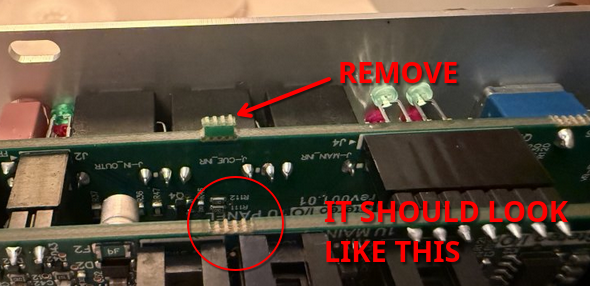
There appears to be a small tab on the board that sticks out and prevents the module from going into the rack.
-- Bodythief

carefully remove/break away the tab (for example with pliers) - it has no connectivity so it will not be an issue

happy patching


...I'm finally getting around to putting mostly all in one case...
-- dform98

Purely out of curiosity: do you build your mega case yourself, or is it something you buy ready-made?
How big will it end up being in the end?
And what non-Eurorack gear are you using together with the case (I noticed you have a Cirklon expander mounted in it)?


For my permanent wiring I exclusively use right-angle plugs, and for regular patching I use straight plugs.
That makes it very easy to completely unpatch the rack without accidentally pulling out connections that are meant to stay permanent.

Long term, I’d like to switch the permanent wiring to Tendrils – Stakkas, but that’s mainly a matter of cost and availability.

When entire cable runs go vertically through the case, I also don’t mind placing a blank panel underneath them.

Unfortunately, I think my custom internal signal bus is hard to retrofit into “normal” Eurorack cases simply due to space constraints.
On top of that, I’ve modded all relevant modules by soldering a small wire to their CLOCK, RESET, and GND points and adding a custom connector. It’s a very minimal modification and easy to undo, but understandably not everyone is comfortable doing that.
Anyway, I’m planning to put together a small presentation about it sometime soon.

As for clocking in general: I don’t know how it is in your system, but in mine it’s technically impossible to drive all clock/reset-capable modules from the same clock. Roughly half of them would have an offset.
Because of that, I built an alternative master clock using an Arduino.

The idea is simple: the first clock pulse is withheld, not sent out.
Additionally, some modules in my setup require an inverted reset signal to end up perfectly in sync again after pressing stop/start.

It’s a bit unfortunate that there’s no real standard for this.

Right now I’m very keen to try @roboDNA’s PULSE module. I’m really curious whether it can solve these sync issues and potentially make my Arduino obsolete.
Ideally, it would also allow tempo divisions (and maybe multiplications in the future) for permanently patched modules while accounting for the often very idiosyncratic reset behavior of different modules. In case it solves this problem i probably will add 2 PULSE instances to my rack.

What matters most to me is simple:
after hitting stop and start, everything must still be perfectly in sync.


...Any suggestions for making this more usable in general would be great...
-- dform98

I also have a rather large case. I can’t really give you a concrete recommendation, but I can share some of my personal learnings from the last few years.

Some of these points may not apply to you, since my setup has a few special characteristics:

  • In most situations, the case is used by two people simultaneously.
  • The case sits on a wheeled, height-adjustable desk, so it can be used sitting or standing.
  • I designed a custom, internal “signal bus” inside the case that supplies most clock- and reset-capable modules from the back with clock and reset signals by default.
    This default routing can be overridden (“overpatched”) via a dedicated module if needed.
  • The horizontal part of my case is 6U. It mainly holds a Keystep Pro and a Launchpad for drum sequencing.

First approach: Top to bottom (by rough function)

I initially organized the case from top to bottom with a coarse functional grouping:

  • VCOs
  • Filters + envelopes
  • Envelopes + VCAs + utilities
  • Drum section + utilities
  • Mixer + effects
  • Sequencers

What bothered me most with this setup was that, once patches were already in place, I constantly had to look closely to understand what was currently doing what and how things were connected.


Second approach: Outside to inside

Next, I tried an “outside to inside” layout. In most rows it looked roughly like this:

VCO | Filter | Envelope | VCA | FX || Modulation / Utilities || FX | VCA | Envelope | Filter | VCO

Pros

  • In many cases, the signal flow was easier to remember and visually more intuitive.

Cons

  • I tended to patch the same or very similar signal flows over and over again, instead of exploring new routing ideas.

Current approach: Relevance-based (pretending the case is smaller)

My current strategy is to pretend that I have a much smaller case and to arrange modules primarily by relevance — a softened form of “decluttering”.

  • Modules I use rarely or that have little interaction go into the upper half (top 9U).
  • Modules that should live in my fictional “small case” go into the lower half (everything below those top 9U).

The lower half now again starts from the top with VCOs.

With this setup, I can reach basically everything while sitting down, without having to stand up. Cable runs also tend to be a bit shorter.

If it turns out that I start using a module from the upper half a lot, something from the lower half has to make room — and that module moves down.


General principles that apply to all approaches

  • Same brand grouped together?
    Absolutely not — and completely irrelevant anyway. My case is not a beauty salon.
    Quite the opposite: duplicate modules or modules with similar functionality are deliberately spread left and right across the case to keep cable runs shorter.

  • The drum section is always grouped together as a “drum island”, with its own mixer, and is largely permanently patched.

  • The final mixer sits in the center of the lowest vertical row.

  • At the very front of the horizontal part of the rack (which is fairly small in my case due to the Keystep Pro and Launchpad), I keep performance-oriented modules:

    • Master FX over the full audio sum (Oxi Meta)
    • Control for a DJ-style filter over the full drum sum (Disting mk4)
    • Manual triggers
    • Joystick

Maybe one or two of these thought processes are useful to you.

Happy patching with your impressive setup!


Hi and welcome 🙂
Your question is extremely open-ended, so there are about a dozen different ways to interpret it right now.

For example, do you mean:
Are you trying to patch a real, physical Eurorack on your desk?
Or are you talking about ModularGrid’s virtual rack view?
Which modules are involved?
Just to be clear: ModularGrid is mainly a planning tool, not a full modular simulator.
If your goal is to learn how patching works, you might want to start with something like VCV Rack, which is free and specifically designed for experimenting and learning patching concepts without hardware.
If you can clarify what exactly you’re trying to do and where it fails, people here will be much better able to help 👍

Wie du vielleicht bemerkt hast, kommunizieren auch deutschsprachige Benutzer hier im öffentlichen Forum ausschließlich auf Englisch.


I am in Belgium. And unfamiliar (reads as "scared") with soldering ;)
-- alexbreugelmans

Here in Austria we have quite a few DIY / makerspaces. You can either rent workshop space with tools and machines (3D printers, woodworking tools, etc.), or get hands-on help with all kinds of practical repairs.

It might be worth checking whether something like this exists in your area and asking if they can help you out.

If you really can’t find anyone locally and you’re okay with sending the module to Austria, I’d be happy to resolder or replace the fader for you.


Hi, one of the sliders (number 9) of my Stillson seems defunct: no light flashing, but also no reactions to change of tone. is there someone who can look into this module and fix it?
Greetings
Alex
-- alexbreugelmans

you might want to mention where in the world you’re located 🙂
That makes it a lot easier for someone to know whether helping with a repair is realistically possible.

Just as a heads-up: slider replacement itself isn’t a big deal, and with a bit of luck it might not even need replacing at all — sometimes it’s just a cold solder joint.

That said, it does make sense to have a replacement fader ready beforehand, for example something like this:
https://www.digikey.at/de/products/detail/bourns-inc/PTL30-15R0-104B2/16356753

(Just as an example link — you’ll need to research the exact specs yourself.)

Hope you get it fixed!


@modulargrid Thanks a lot for adding the category!

A small note, slightly off topic:
If you want Precision Adder to appear as the first category — which makes sense for some modules where that’s the main function — you can do the following:

Deselect all other categories except Precision Adder and save the module.

Then re-add the other categories and save again.

That way, Precision Adder will stay at the top.

By the way, sometimes it’s really inconvenient that “approved by manufacturer” entries can’t be edited — especially since there probably aren’t any moderators actively maintaining those, right?


Giving this a gentle bump — would love to see this category added :)


...i could get a cheap mother32 and DFAM in good conditions from a friend....
-- NoSky

Absolutely — go for it!
My personal opinion: the fewer Behringer modules in your rack, the better
I totally get that price plays a huge role — and yeah, Behringer is hard to beat there.
But if you have the chance to grab an alternative for a similar price, definitely take it!


@Pioneer123
Sounds great! What's that Rhodes-like sound you're playing on the KeyStep — is it the Oxi Coral?


While we wait for admins to intervene, it is just as effective to not fall for his bait and ignore his posts
Please, do not feed the troll.
-- Larsech

@modulargrid I have the impression that the listed forum moderators aren’t really active.
Especially in the past few days, some action might have been necessary.
Maybe it’s time to improve things here.


I had already proposed a possible solution for this annoying problem three years ago:
https://modulargrid.net/e/forum/posts/view/35172


Hey everyone,

Just wondering – are there other modular heads around here who'd be up for some real-life patching, gear talk, or maybe even a casual jam session?

If you're into the idea, feel free to mention your general location (no need to be super specific).
I'm based in the south of Vienna/Austria, for example.

If it sounds like fun, just drop a comment or send a PM — would be great to connect and maybe set something up!


It also would be possible to use only cables without any additional module.
https://schneidersladen.de/de/cordial-cpi-3-pz


...Small businesses can't limit their advertising potential by sacking off these terrible platforms. ...
-- wishbonebrewery

This doesn’t seem to be about advertising on these platforms, but rather that purchasing modules from "Signs Modular" is only possible by contacting them via Instagram or X.

Personally, I also believe there should be an alternative way to get in touch, so that people don’t have to create an account on these morally and socially questionable platforms just to initiate a module purchase.


Thread: System 01

Could be someone be so kind to help me if this system makes sense? Thank You
-- MX___

Sure! Your system technically may makes sense... but only in the same way that a house made entirely of cardboard technically provides shelter.

Behringer modules will make sound, sure, but their business model is basically "copy & undercut," which isn’t exactly what the Eurorack spirit is about. If you’re okay with that, go for it! But if you want to support innovation, independent creators, and long-term quality, you might want to mix in some non-Behringer modules.

TL;DR: It’ll work, but you might wake up one day and realize your entire rack is just a cheap clone of someone else’s hard work. 😉


Hi,

Does anyone has a clue how to connect this to the case? there's apparently no socket for the power and the manual does not say any. I've tried seraching aroud but i've not found anything usefull.
-- sntelectronics

I don't own one, but the picture on the Thomann website seems to show it:
https://bdbo2.thomann.de/thumb/bdb3000/pics/bdbo/9783218.jpg

I'm 99% sure that the long horizontal cable is the power connector (16-pin plug with a 10-pin cable).

EDIT
on https://doepfer.de/a155.htm there is a similar image that shows the power connector


Thread: Adsr use

If you're getting the sound you want, then it might be perfect for you.
In my experience, mixing every voice with silence in a rhythmic way is crucial—otherwise, my output tends to get muddy and overloaded.
Do you have any audio recordings? That would make it much easier to give feedback.


... No idea why the devs cant implement this simple thing into the code for the site.
-- geoffcrowther

Have some patience with the MG developers—it’s not as simple as it might seem.

The option to "Show/Hide modules that are in the current rack" could probably be implemented fairly quickly.
But a full Rack Diff Wizard is a bit more complex.

A proper concept would need to be worked out first:
- What should the input interface look like? Maybe two dropdowns where you select two racks to compare?
- Should it even allow selecting multiple racks at once?
- Do you want to see only the modules that are in all selected racks (the intersection)?
- Or only the ones that are not in the intersection?
- What should happen with the result?
- Should you be able to create a new rack from the comparison?
- Should there be a JSON export that you can manually import as a new rack?
- Or should all modules be tagged with "unracked" and the filter options have to be extended?

So many questions...

You could try drafting a solid concept for it. That would definitely increase the chances of the MG developers implementing it at some point!


is there a way (with the unicorn account) to see which modules you have used from my collection, but not in the active rack. I have a few racks and when i'm planning a new one i'd like to see which are currently used in my other racks
-- geoffcrowther

A few days ago, I needed the same thing.
A diff wizard for two or more racks would be really great.

Since there's currently no way to have a specific number of the same module in your own collection, you'd have to create a separate rack with your collection. That way, it would also work with multiple instances of the same module.

@geoffcrowther As a tedious workaround see https://modulargrid.net/e/forum/posts/view/42725


Thread: Bug Report

It happened again, Plaits is gone! But only when I am logged in, works very well when I am logged out. Mystery module page.
-- pawal

Can you reproduce the issue in a different browser or in a private browser session?
Try deleting all modulargrid.* cookies in the browser where you're experiencing the problem.


different from the last one, what do u guys think honestly of this?
-- skyler

Maybe not bad – but the bass drum is way too loud!
On my sound system, it feels like all the other sounds are at just 10% volume.


... that brings the flexibility of a full-featured sequencer ...
-- FileTransferProtocol

This sequencer looks like a lot of fun!

But does it really have no reset CV-input, or am I missing something?
Wouldn't that mean it inevitably goes out of sync when restarting the master clock?

A demo video with drums or at least a metronome alongside some loops of other sequencers would be super interesting to see!


Does anyone have a copy of the malekko voltage block firmware 1.6 ?
-- Bigbadger65

i found a link to google drive on https://web.archive.org/web/20240803195927/https://malekkoheavyindustry.com/voltage-block-updates/


Thread: Bug Report

The font size on Microsoft Edge is too small for the entire website, almost unreadable...
-- electricfish

Ensure you have 100% zoom. I think the symbol in your address bar indicates a non standard value.
maybe you changed it unintentionally with Ctrl + mousewheel
common keyboard shortcut for 100 % zoom is Ctrl + 0.
those shortcuts should work in most web browsers


Oh my goodness. I've never heard of these but oh wow they seem useful. Thanks for teaching me something new today!

-- HGsynth

Essentially, these NKPs are just a collection of capacitors. Many bus boards already have similar components built in. I can’t say for sure if this is an effective solution for eliminating noise, but I assume it could help in certain configurations.


If you have any idea what it could be, I'd love to hear from you.
-- Hoggres

I don’t have a definitive solution, but I do have a few suggestions to consider:

Approach 1:

Unplug all modules from the power bus. Reconnect the modules one by one. This might help identify if a specific module is causing the noise. If you find the source, consider using a "Noise Killer Plug" on the problematic module: https://www.midi-hardware.com/?section=prod_info&product=NKP

Approach 2:

Take a loose wire and connect one end to the rail of your Eurorack and the other end to the casing of your other equipment (e.g., audio interface, amplifier) or any component involved in your audio signal chain.

Approach 3:

Start by simplifying your audio path to isolate the issue.

Begin with the simplest setup: Eurorack -> amplifier.
Gradually add components: Eurorack -> audio interface -> amplifier. Adapt this sequence based on your actual setup.

Approach 4:

Try using a different sound system. Take your rack to a friend’s place and test it there. If the noise is absent, there might be a device in your home setup (e.g., a refrigerator) causing interference. Rotating power plugs by 180 degrees might help (if your country uses reversible power plugs).

Personal Experience:

I have a "WMD Performance Mixer Mk1" that produced significant noise through my speakers. After connecting this module to a different power supply in my rack (I have eight Meanwell RT-65B units), the noise disappeared. Replacing the Meanwell RT-65B made no difference. This suggests that certain module combinations within the same power supply can create noise issues.

Good luck!


Finally circling back around here... This doesn't seem to be returning all of my modules. Are their other parameters for paging through, or a flag to dump everything?
-- out_of_band

Monitoring the requests of your browser should give you an idea what is possible

https://modulargrid.net/e/modules/find/page:1.json?SearchSet=my
https://modulargrid.net/e/modules/find/page:2.json?SearchSet=my


...Its very difficult as well to see how far the two triggers are apart, since it's just milliseconds of difference.
How do you guys handle this issues?
-- deurstopjoris

i highly recommend to analyse the signals via some monitoring like the mordax data.
its not that cheap but its one of the most useful modules i have. it helped me out hundrets of times when i did not understand why this or that does not work like expected. Thanks to this module i learned so much about eurorack!

pretty sure with some multi channel oscilloscope you can identify the specific module(s) where the microtiming gets messed up!?


When dealing with huge racks that are very full its often a pain to perform tiny rearrangements
it would be great to workaround this by temporary injecting empty rows and remove them again
something like this

Row functions
├── Swap Rows
│   ├── Row 1
│   │   ├── with Row 2
│   │   └── with Row 3
│   ├── Row 2
│   │   ├── with Row 1
│   │   └── with Row 3
│   └── Row 3
│       ├── with Row 1
│       └── with Row 2
├── Move Row
│   ├── Row 1
│   │   ├── to position 2
│   │   └── to bottom
│   ├── Row 2
│   │   ├── to top
│   │   └── to bottom
│   └── Row 3
│       ├── to top
│       └── to position 2
├── Insert empty row
│   ├── 3U
│   │   ├── top
│   │   ├── between rows 1 & 2
│   │   ├── between rows 2 & 3
│   │   └── bottom
│   └── 1U
│       ├── top
│       ├── between rows 1 & 2
│       ├── between rows 2 & 3
│       └── bottom
└── Remove empty rows
    ├── all
    ├── empty row y
    └── empty row x

-- modular01

@modulargrid have you ever considered to implement this feature (at least the move row functionality)? It shouldnt be that time consuming!? i am still willing to help out.

...filter/sort "My Modules" to only show modules not currently used in the displayed rack...
-- proppy


...A filter on "My Modules" to show only modules not in the current rack would be very helpful when contemplating swaps...
-- gimbalgambit


...I wish I could filter/sort by whether a module is in the rack I am currently viewing...
-- adamj

@proppy @gimbalgambit @adamj & many more who requested this feature within the last years
As an ugly workaround you can open the javascript console of your browser and execute this snippet:

Hide modules that are already in the rack

$('.box-module').show(); $('.box-module.in-rack').hide();  

Hide modules that are not in the rack

$('.box-module').show(); $('.box-module:not(.in-rack)').hide();  

But be aware that this only applies to already displayed modules! So you may have to scroll down after clicking My modules


Does it make sense to lock module editing even when there is no information about module depth or 5V power consumption?
for example: https://modulargrid.net/e/winter-modular-eme-black

@modulargrid: consider to make those fields required before beeing able to set it to "Approved by manufacturer"


Power Supply (uZeus 4HP) specs:
+12V: 2000 mA
-12V: 500 mA
+5V: 170 mA

Doepfer basic VCO A-110-1 needs:
+12V: 90 mA
-12V: 20 mA
+5V: 0 mA

Moog Mavis needs:
+12V: 112 mA
-12V: 0 mA
+5V: 0 mA

you can simply sum up those numbers for each power line (+12V, -12V, +5V) and compare it with the numbers of your power supply. as a recommendation you should not exceed 75-80% of the given power supply

If those numbers are correct (please verify yourself) it is totally safe to use it for your 2 modules. Further you have a lot of headroom for more power hungry modules left...


...This does not work for you?

-- modulargrid

copy/paste modules does work within both browser windows. but each with its separate server side clipboards.
it makes no difference if i edit the identical rack or 2 different racks. i use firefox and chromium on linux


You can copy/paste from different browsers..

modulargrid.com is now an alternative domain for modulargrid.net.

-- modulargrid

copy/paste modules between .net and .com top level domains does also not work. each site has its own "server side clipboard".
the urls
/e/modules/add_to_clipboard.json?moduleId=xxx
and
/e/modules/get_from_clipboard.json
seems to be persisted in the MG database on a user session basis instead of a user basis!?


You can copy/paste from different browsers..
-- modulargrid

This does not work for me
each browser session has its own clipboard


When dealing with multiple browser windows for rearrangements all windows are doomed to use the same zoom level.
This is a bit tedious when dealing with one huge and one small rack.
As far as i know the browser zoom level is always the same for each (sub)domain.

@modulargrid can you try to add a 2nd subdomain which serves the same site (like www2.modulargrid.net ) to allow different zoom levels?
Or will this break the copy paste functionality?
In case you give it a try dont forget to set canonical meta tags and disable site indexing.
thx!


Is it possible to automatically create a rack with all modules in my collection?

as far as i know this is not possible

Or at least to see the total HP of the collection?

At the bottom of your racks there is a link to the data sheet:

At the bottom of the data sheet you can see the total HP

Would like to somehow see everything that I have.

you can add all modules of your rack(s) to your collection:

You have a list of all your modules in the my modules tab:


Thread: Bug Report

Found some querying inconsistencies in the Module Finder when it comes to modules listed under the "Other/unknown" manufacturer:
...
-- drohn

"other/unknown" is excluded on purpose which makes sense to me.
There is a hint when you have 0 search results as well:


...I would apreciate a healthy discussion on this topic, do you have sync problems or is your system working...
-- GunnarWaage

Maybe a bit off topic because i dont use "sample accurate sync" but here is my synchronisation experience:
We have a lot of jam sessions with all kind of electronic music equipment (dozens or close to 100 different syncable devices within the last years).
Everything is synced via MIDI clock and in some subsystems this MIDI clock gets converted to CV-clock/reset via Arturia devices (Keystep PRO, Beatstep PRO) or PAMs.
In those hardware based setups sync accuracy has never been an issue.

As soon as a laptop or tablet (windows, mac, ios, android) needs to be synced as slave things start to get inaccurate.
But every better software has the possibility to adjust the clock-sync-offset in milliseconds.
Strange thing i experienced is that the needed offset value is often very different compared to former jam sessions with the same equipment.

There are indeed a few syncable eurorack modules that are always a single CV-clock-tick ahead.
To solve this issue i have built an arduino that holds back the very first clock tick after start.
Now i have 2 different master clocks in my eurorack to get everything in perfect sync
https://github.com/othmar52/blazing-baton-eurorack


... Can you just use some special cables in place of the small shunts that currently need to be physically moved from the LPF pins to the HPF ones? Is this what you mean by jumper cables? Thanks!
-- thermal

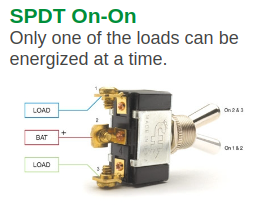
you can replace those red jumpers

with "Arduino Jumper wires"

connected to any SPDT switch (center pin on PCB to center pin on switch)

if you need further assistance feel free to PM me to keep this thread module specific...


...Bit of a shame there aren't switches for this on the face of the module as it's a pain to take the module out mid session to swap the jumpers on the back...
-- thermal

in case you have 2HP left it shouldn't be that hard to turn a blank panel into a non-destructive breakout module with a few small switches.
with long jumper cables it also would be possible to place this breakout module in the row above or below...
two years ago i made something similar https://www.modulargrid.net/e/other-unknown-a-128-bypass-breakout


All versions of Happy Nerding - FX Aid seems to be capable as well:
image

Further Expert Sleepers - Disting MK4 has also a DJ-Filter algorithm:
image