

M300 Digital Reverb
MXR
This offer was fetched from reverb.com. You cannot contact the seller via ModularGrid. You have to visit their site.
Look up onOffer Details
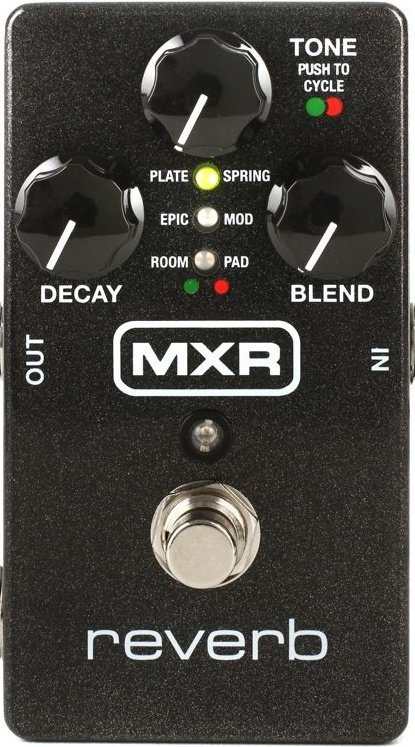
MXR REVERB - M300 - GUITAR EFFECTS PEDALThe Reverb delivers six distinct exquisitely crafted reverb styles, a hi-fi analog dry path with a massive 20 volts of headroom, and numerous other features to tailor your reverb sound.This pedal can be powered by the included Dunlop ECB003 9-volt adapter, or the Iso-Brick™, and Mini Iso-Brick™ power supplies (not included.THE LONG STORYThe MXR Reverb delivers six distinct high end reverb styles, each exquisitely crafted and tuned by the award-winning MXR design team.It all comes in a standard-sized MXR box with a simple three-knob setup and a hi-fi analog dry path with a massive 20 volts of headroom thanks to Constant Headroom Technology™.Each reverb style is as richly detailed as any found in the highest-end rack units and plug-ins, and all you have to do to step through them is push the Tone knob.The PLATE setting provides a shimmering smooth wash of space that's a go-to choice from the studio recording world.SPRING sets a new standard for truly authentic sounding reverb without coiled metal—a perfect recreation of the classic amp-based effect, with the Tone control taking you from dark vintage amp spring, through classic jangle, to bright surfy splatter.EPIC is a unique combination of multiple interwoven analog-tone delay lines and complex modulation—perfect for solos from that more shaded part of the lunar landscape.MOD throws down a plate-flavored spaciousness with richly organic modulation in the feedback path.The ROOM style adds subtle body and projection to your guitar tone at shorter decay times while longer decay times yield rich organic space that doesn't wash out.PAD closes out the line-up with a unique combination of sub-octave + octave-up with echoes + "shimmer" + synth/organ modulation + reverb.Connect a Dunlop DVP series volume/expression pedal to the expression jack to toggle and blend between two different knob setting configurations.The Reverb includes 100% wet mode, stereo input and output capability, and true relay or trails bypass.DESCRIPTION• Six meticulously crafted reverbs in one pedal• Audiophile quality analog and digital audio paths• Dry path is 100% analog• Studio-grade low noise floor• Trails Bypass mode lets effect ring out after turning the pedal off• Expression pedal jack for foot control of all knob settings• Stereo In/Out capability when using TRS cablesCONTROLSEXP output allows blending of two setting configurations with an expression pedal (not included)FOOTSWITCH toggles effect on/bypass (blue LED indicates on)LED column indicates selected reverb styleDECAY knob sets length of reverb decayTONE knob shapes EQ of effect (or octave blend for PAD setting) and selects reverb styleMIX knob sets reverb signal levelPOWERThe MXR Reverb requires 9 volts (240mA) and can be powered by the included DunlopECB003/ECB003EU adapter or the Iso-Brick™ Power Supply.This pedal cannot be powered by a battery.DIRECTIONS• Run a standard instrument cable from your guitar to the M300’s INPUT jack and another cable from the M300’s OUTPUT jack to your amplifier.• If using an expression pedal, run a TRS cable from the M300’s EXP jack to your expression pedal.• Start with all controls at 12 o’clock.• Turn the effect on by depressing the footswitch.• Push in the TONE control to cycle through reverb styles, indicated by red or green LEDs in the LED column. See REVERB STYLES section for a description of each style• Rotate DECAY control clock-wise to increase length of reverb decay or counterclockwise to decrease it.• Rotate TONE control clockwise for a brighter reverb sound or counterclockwise for a warmer reverb sound.• Rotate the MIX control clockwise to increase reverb signal level or counterclockwise to decrease it. Fully clockwise results in an equal 50/50 mix of reverb and dry signals.NOTE: You may notice that the M300’s housing warms up while on. This is completely normal. Take care when operating in extremely high ambient temperatures or direct sunlight.REVERB STYLES• PLATE: Classic studio plate reverb. Indicated by green LED.• SPRING: Classic guitar amp reverb. Indicated by red LED.• EPIC: Multiple interconnected modulated delays. Indicated by green LED.• MOD: Modulated studio plate reverb. Indicated by red LED.• ROOM: Simulates small room, early reflection slap-back sound. Indicated by green LED.• PAD: Blend of octave down and octave up synth sounds with reverb effect. Indicated by red LED. Use TONE control to blend—fully counterclockwise provides one octave down and fully clockwise provides one octave up. The 12 o’clock position provides both an octave up and an octave down. Use DECAY control to set synth pad and reverb decay.USING AN EXPRESSION PEDALAn expression pedal such as the DVP4 Volume (XL)™ Mini Pedal or the DVP3 Volume (X)™ Pedal can be used to toggle and sweep between two different setting configurations:• Connect an expression pedal to M300’s EXP jack using a TRS cable, and set rocker to its heel-down position. Adjust knobs as desired. Note: Expression pedal cannot be used to change reverb style.• Move rocker to its toe-down position. Adjust knobs as desired to a different setting configuration.• Moving rocker back and forth will move effect sound smoothly between those two settings.STEREO MODEThe M300 can be run in either Mono (default) or Stereo modes, selectable via internal switch, which determines tip/ring input connection.For a stereo setup, run a TRS splitter cable to the M300’s INPUT jack and another from the M300’s OUTPUT jack to your amplifier. Next, set internal STEREO/MONO switch to its LEFT position (see Diagram A). Note: When M300 is bypassed, output ring connection will only receive signal if M300 is set to Trails Bypass mode (see below).ADVANCED FUNCTIONS –STARTUP MODEAdditional functions can be accessed by entering Startup Mode. Advanced function settings will remain in selected state, even after pedal is powered off. Re-enter Startup Mode and follow relevant steps to change settings again.1. Disconnect M300 from power supply and set DECAY and MIX controls to 12 o’clock.2. Enter Startup Mode by pushing down and holding TONE knob while connecting M300 to its power source.TRAILS BYPASS MODEThe M300 uses a “true bypass” relay by default, shutting off effect and hardwire bypassing the tip connection signal as soon as you turn the pedal off (ring connection uses buffered bypass).The M300 can also be operated using Trails Bypass mode, which uses a buffered bypass and allows the reverb effect to ring out even after you turn the pedal off.1. After entering Startup Mode, release TONE knob. LED column will now reflect bypass mode status. Green LEDs indicate factory-set True Relay Bypass mode, while red LEDs indicate Trails Bypass mode.2. Press TONE knob to toggle between modes.3. Depress footswitch to exit Startup Mode and resume normal operation.WET MODEThe M300 can be set so that only the wet signal is sent to your amplifier.1. After entering Startup Mode, observe LED column for mode status. Green LEDs indicate factory-set Dry mode. Red LEDs indicate Wet mode.2. While still pushing down on TONE knob, rotate DECAY or MIX knob clockwise past 12 o’clock to select Wet mode, indicated by red LEDs. To return to Dry mode, rotate DECAY or MIX knob counterclockwise past 12 o’clock. Green LEDs will light up and red LEDs will turn off.3. Release TONE knob to save your selection and depress footswitch to exit Startup Mode and resume normal operation.SPECIFICATIONSInput Impedance 1 MΩOutput Impedance 100 ΩMax Input +5 dBVMax Output Level +5 dBVNoise Floor -107 dBVSampling Rate 96 kHzCurrent Draw 240 mAPower Supply 9 volts DC
Used Price History
If you had an Unicorn Account you could see a chart with the price development of this module and the average price asked for this module.
About the Unicorn Account